Coming soon · Release date: October 15, 2026 · Info based on official announcements Official store ↗
UpdatedBluey's Happy Snaps platforms and wishlist: Launch Guide
Bluey's Happy Snaps platforms and wishlist guide covers PC and consoles, Steam wishlist steps, editions, and the October 15 release. Get ready to play.
Jump to

Get Ready for Bluey’s Next Adventure
Dad’s old camera is about to turn a family outing into a scrapbook adventure, and this Bluey's Happy Snaps platforms and wishlist guide will help you prepare. With an October 15, 2026 release planned across PC and consoles, choosing the right version matters before you place an order. Here’s everything you need to know about Bluey's Happy Snaps platforms and wishlist options, including digital releases, physical availability, editions, and Steam features.
As of October 9, the game is still awaiting its Steam launch. Gameloft is both its developer and publisher, with Gameloft Brisbane developing the adventure in collaboration with Ludo Studio and BBC Studios.
The premise is easy to picture: Bluey and Bingo discover Bandit’s old camera, explore familiar places, and collect photographs for a scrapbook. Along the way, you can play with toys, encounter wildlife, and find activities inspired by the show.
For families planning to play together, there’s another useful detail: a second player can join the adventure alongside the person handling the camera. The game’s description also explicitly states that there are no in-game purchases and no online play.
Bluey's Happy Snaps Platforms and Wishlist Availability
The announced digital lineup includes PlayStation 4, PlayStation 5, Xbox One, Xbox Series X|S, Nintendo Switch, Nintendo Switch 2, and PC. Physical editions have a narrower announced lineup and will be available in select markets.
 Image: Steam / Gameloft
That distinction matters if you’re buying a gift or prefer a boxed game. A platform receiving a digital release does not automatically mean a physical version has been announced for it.
| Platform | Announced digital release | Announced physical release |
|---|---|---|
| PlayStation 4 | October 15, 2026 | Not listed in the physical announcement |
| PlayStation 5 | October 15, 2026 | October 15, in select markets |
| Xbox One | October 15, 2026 | October 15, in select markets |
| Xbox Series X|S | October 15, 2026 | October 15, in select markets |
| Nintendo Switch | October 15, 2026 | October 15, in select markets |
| Nintendo Switch 2 | October 15, 2026 | October 15, in select markets |
| PC | October 15, 2026 | Not listed in the physical announcement |
Steam lists October 15, 2026 as its planned release date. The console announcement gives the same calendar date, but an exact unlock time is not included in the available information. Avoid treating that date as a promise of midnight availability in your time zone.
For PC players, Steam has a wishlist option.
If you’re choosing between console generations, check the product listing for your actual hardware. Separate announcements for Nintendo Switch and Nintendo Switch 2, for example, do not establish upgrade rights or compatibility between editions. The same caution applies to PlayStation and Xbox purchases: cross-generation entitlements are not specified.
For a physical copy, check your local retailer’s platform, edition, and regional availability before ordering. “Select markets” means the boxed release should not be assumed to reach every country or every store.
How to Wishlist the Game on Steam
The clearest actionable option in this Bluey's Happy Snaps platforms and wishlist guide is Steam. Its listing invites signed-in users to add the game to their wishlist and receive a notification when it becomes available.
 Image: YouTube / XBOX
Open the Bluey's Happy Snaps Steam store page and use the wishlist control. If you’re browsing without an account signed in, Steam prompts you to sign in before adding it.
| Action | What to do | What it means |
|---|---|---|
| Open the listing | Visit the game’s Steam store page | Review the planned release date and PC details |
| Sign in | Use your Steam account when prompted | Access the wishlist option |
| Add to wishlist | Select “Add to your wishlist” | Request Steam’s availability notification |
| Follow the game | Use Steam’s separate follow option if desired | Keep wishlist and follow actions distinct |
Wishlisting does not purchase the game. The October 9 listing says it is not yet available on Steam and presents the wishlist as a way to track its arrival.
The listing also includes announcements, including an October 5 gameplay overview featuring Bindi Irwin. Those updates can help you understand the photography and scrapbook activities before deciding whether to buy.
For console purchases, consult the relevant platform’s product listing for available preorder or tracking options. Specific console wishlist steps are not established in the information here, so don’t assume every storefront uses Steam’s controls.
You can also sign up for game news through Gameloft’s website. That is a separate option for receiving updates; it does not replace a platform purchase or add the game to your Steam account.
Before committing to a preorder, review the exact product description. The available details do not establish a universal preorder bonus, launch discount, or price across platforms.
Compare Standard, Deluxe, and Activity Book Editions
Platform choice is only part of preparing for launch. Gameloft presents Standard, Deluxe, and Activity Book editions, with different extras attached to each.
 Image: Steam / Gameloft
When comparing Bluey's Happy Snaps platforms and wishlist options, keep the edition decision separate from the hardware decision. An edition’s appearance on the game website does not establish that every retailer carries it for every platform.
| Edition | Listed contents | Availability detail |
|---|---|---|
| Standard | Game and Activity Cards | Check the relevant product listing |
| Deluxe | Game, “Here Come the Grannies” bonus digital content, Extra Dress-Up Items, Digital Deluxe Album, Sticker Sheets, and Activity Cards | Check the relevant product listing |
| Activity Book Edition | Deluxe Edition, a 44-page activity book, and two extra sticker sheets | Local retailer availability applies |
The Standard Edition lists Activity Cards alongside the game. The available description does not explain how those cards are delivered, so check the listing rather than assuming they are printed or downloadable.
The Deluxe Edition adds dress-up items and other extras, including “Here Come the Grannies” bonus digital content. Its exact gameplay scope is not described here. Treat it as listed bonus content without assuming it adds a particular location, mission, or amount of playtime.
The Activity Book Edition pairs the Deluxe Edition with a 44-page collection of drawing pages and simple activities, plus two extra sticker sheets. If the physical activity book interests you, verify that the retailer’s listing explicitly names this edition.
A useful approach is to compare the listed extras against what your household actually wants. Someone interested in the game itself can focus on the Standard listing, while someone seeking the activity book can check local stock. Without confirmed prices, there’s no supported basis for declaring one edition the better value.
Check PC Requirements and Family Play Features
PC specifications deserve a closer look before launch. This part of the Bluey's Happy Snaps platforms and wishlist decision is practical: owning a computer does not establish that it meets the listed requirements.
Steam provides both minimum and recommended specifications. Both require a 64-bit processor and operating system, and both list 5 GB of available storage.
| Component | Minimum | Recommended |
|---|---|---|
| Operating system | Windows 11, or a valid compatibility layer | Windows 11, or a valid compatibility layer |
| Processor | AMD Ryzen 5 5500 / Intel Core i3-12100F | AMD Ryzen 5 3600X / Intel Core i5-10400 |
| Memory | 8 GB RAM | 16 GB RAM |
| Graphics | AMD Radeon RX 6400 / Nvidia GeForce GTX 1650 | AMD Radeon RX 5700 XT / Nvidia GeForce RTX 2060 Super |
| DirectX | Version 11 | Version 12 |
| Storage | 5 GB available | 5 GB available |
| Network | Broadband internet connection | Broadband internet connection |
Compare your computer with these requirements before purchasing. The listing does not provide frame-rate targets or resolution-specific performance figures, so the specifications should not be read as a guarantee of a particular visual setting.
Steam also displays Steam Deck Verified status. That gives handheld PC players a specific compatibility designation to consider, although it does not establish battery life or performance measurements.
The developers recommend playing with a controller, and the listing identifies Xbox controllers. Keyboard bindings and detailed controller layouts are not provided here.
Other listed Steam features include achievements, Steam Cloud, and Family Sharing. Their presence does not explain individual achievement requirements, save behavior across different platforms, or console account-sharing rules.
What Does Playing Together Involve?
The game description says a second player can explore, pose for photographs, and play with toys alongside the main player. The main player leads from behind the camera while the second player participates in the scene.
That setup offers a straightforward way to share the photography premise: one person frames the moment, while the other joins the activity. The available details do not specify joining controls or confirm Steam Remote Play Together support.
The Steam description explicitly says the game has no online play and no in-game purchases. It also lists a broadband connection in its PC requirements. Those statements do not establish that every PC function works without an internet connection.
For launch preparation, a good approach is to settle your platform and edition, check the listing for your hardware, and then use the available wishlist or purchase option. Bluey's Happy Snaps platforms and wishlist planning can stay simple once those choices are clear.
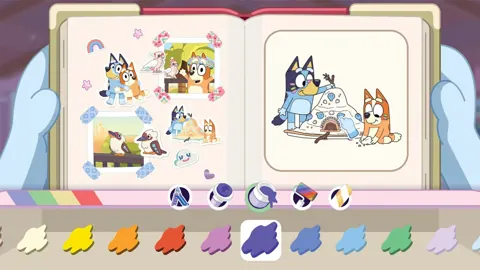
The adventure itself centers on exploration, photography, and creative scrapbooks. Photos become scrapbook memories, while the camera helps you collect stickers and decorations. Familiar locations include places associated with episodes such as Ice Cream and The Sign.
The game also includes activity ideas intended to carry play beyond the screen, such as backyard birdwatching and imaginative play with toys. If those ideas interest your family, leave room to try them after a session without assuming that every activity requires extra equipment.
FAQ
What are Bluey's Happy Snaps platforms and wishlist options?
The announced digital platforms are PS4, PS5, Xbox One, Xbox Series X|S, Nintendo Switch, Nintendo Switch 2, and PC. Steam offers a wishlist option. Physical releases are announced for PS5, Xbox One, Xbox Series X|S, Nintendo Switch, and Nintendo Switch 2 in select markets.
When does Bluey's Happy Snaps come out?
The announced release date is October 15, 2026. As of October 9, Steam lists it as an upcoming release. An exact unlock time is not provided.
Can you play Bluey's Happy Snaps together?
Yes. The game description says a second player can join side-by-side to explore, pose, and play with toys while the main player handles the camera. It explicitly states that there is no online play.
Is Bluey's Happy Snaps Steam Deck Verified?
Yes. The Steam listing displays Steam Deck Verified status. It also recommends controller play, but does not provide battery-life estimates or specific performance targets.
Continue with
 Bluey's Happy Snaps release date countdown: Launch GuideBluey's Happy Snaps release date countdown: Get ready for October 15, 2026, with platform details, editions, Buddy mode, and an easy launch-day checklist.
More in Release

Bluey's Happy Snaps developer and publisher: Who Does What?
Meet Bluey's Happy Snaps developer and publisher, learn what Gameloft Brisbane handles, and explore release dates, platforms, editions, and family play.

Bluey's Happy Snaps FAQ: Release, Co-op, and Editions
Bluey's Happy Snaps FAQ covers the October 15 release, platforms, local co-op, editions, price, and PC requirements. Plan your family's photo adventure.
Bluey's Happy Snaps system requirements: PC Specs Explained
Check Bluey's Happy Snaps system requirements, compare minimum and recommended PC specs, and review Steam Deck support and console storage before launch.
Bluey's Happy Snaps trailer and screenshots: What to Know
See Bluey's Happy Snaps trailer and screenshots, explore photo gameplay and Buddy mode, and find out what to expect before the October 15, 2026 release.
Join the community
Official channels for news, updates and player help: